


A warehouse gateway uploads sensor readings without trouble during the morning shift. By afternoon, nearby wireless devices are competing for airtime, and updates begin arriving late. Adding internet bandwidth may not fix the problem. The wireless link itself could be congested. Dual band WiFi offers another route for compatible devices, but knowing when to use each band matters more than simply enabling both.
What Is Dual-Band Wi-Fi?
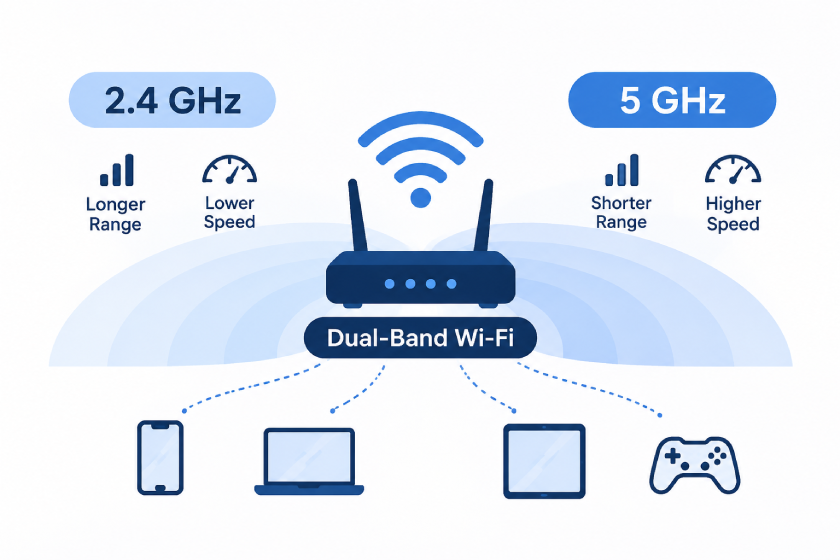
If you are asking what is dual band wifi, the answer is straightforward: it describes equipment capable of connecting over the 2.4 ГГц и 5 GHz Wi-Fi frequency bands. Each has different coverage and capacity characteristics. A dual-band router commonly makes both available, while a dual-band client can choose a supported connection.
Dual-Band Wi-Fi for IoT Gateways: Why Switching Bands May Not Fix the Uplink
If your Интернет вещей шлюз still sends sensor updates late after you changed its Wi-Fi band, dual-band may seem like the fix. It can help when one frequency better fits the uplink conditions, but it is not a reliability switch. The key is to separate the Bluetooth sensor-to-gateway link from the gateway’s Wi-Fi connection to the upstream network.
Two Wi-Fi bands, one gateway uplink
A dual-band IoT gateway supports Wi-Fi on both 2.4 ГГц и 5 ГГц. The bands offer different uplink options; the gateway connects to an upstream Wi-Fi access point using the supported band or switching behavior defined by its hardware. The Wi-Fi Alliance describes most Wi-Fi 5 products as dual-band, while TP-Link explains the common 2.4/5 GHz arrangement.
That does not give the gateway two internet connections or mean it sends each packet over both bands at once. The gateway’s Wi-Fi hardware typically establishes an uplink over one selected band; its Bluetooth Low Energy link to sensors is separate. Confirm simultaneous operation or automatic switching in the model documentation.
If a gateway fails after you change its network name or Wi-Fi settings, check its supported bands and security requirements before blaming the access point. Bluetooth sensors connect to the gateway over Bluetooth Low Energy; they do not need to join the gateway’s Wi-Fi band.
The two bands trade range for speed potential
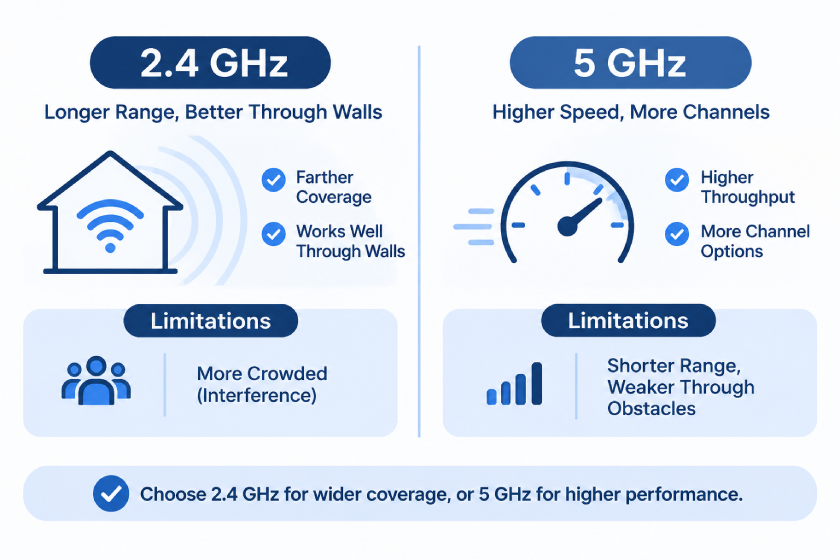
Neither frequency is automatically the right choice for every gateway installation. В общем, 2.4 GHz is often more useful at a distance or through obstacles, пока 5 GHz can offer higher data rates when the uplink is strong and the gateway supports it.
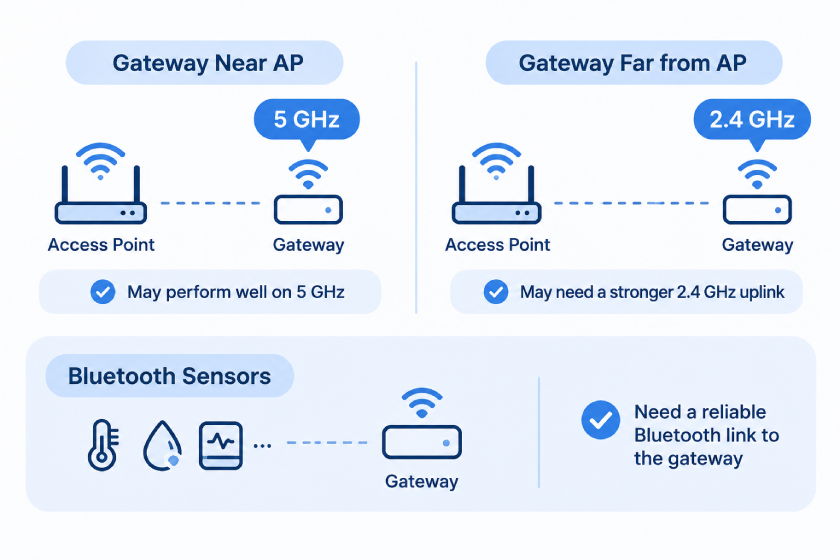
Использовать 5 GHz for a gateway near a compatible Wi-Fi access point when higher throughput is useful. Consider 2.4 GHz when the gateway is farther away or obstacles weaken the 5 GHz link. The Bluetooth sensor-to-gateway connection is separate, so choose the Wi-Fi band based on the gateway’s uplink conditions.
If you chose 5 GHz because you heard it is always faster, compare the gateway’s connection at its actual installation point. A stronger 2.4 GHz uplink may be more reliable than weak 5 ГГц. Intel notes that practical coverage differences can be modest in some homes, while Google lists distance, строительные материалы, frequency, and device type among factors affecting Wi-Fi speed.
Dual-band offers uplink options, but cannot promise faster internet
A dual-band Wi-Fi network can distribute wireless traffic across bands when the access point and connected clients support that setup. An IoT gateway is a Wi-Fi client, not a traffic manager: its dual-band capability does not allocate frequencies to other devices. The Wi-Fi Alliance describes a potential network-capacity benefit from using a less-crowded band, not a guarantee that one gateway’s speed or the internet plan will double.
Slow sensor updates can arise on different parts of the data path: the Bluetooth link from sensor to gateway, the Wi-Fi uplink from gateway to access point, or the upstream network and internet service. Identify which link is failing before changing bands. Google notes that device limits, расстояние, препятствия, shared bandwidth, and ISP service can affect Wi-Fi performance.
What to check when switching gateway bands does not help
Use the pattern of the problem to narrow the cause. If multiple sensors connected to one gateway stop reporting, check the Bluetooth reception at that gateway. If the gateway itself loses its network connection, check its Wi-Fi signal, supported band, access-point configuration, and upstream service.
Test one change at a time and compare results from the same gateway location. Moving the gateway nearer to the Wi-Fi access point can help isolate an uplink range issue, but also check that it remains within Bluetooth range of the sensors. If Wi-Fi remains poor across a large site, review access-point placement and backhaul rather than repeatedly switching bands.
One Wi-Fi name does not mean one band
Seeing one network name does not prove that the upstream Wi-Fi network uses only one frequency. Some systems combine bands under one SSID and manage client connections in the background; others expose separate names. Google Nest uses one name across supported bands, while NETGEAR Smart Connect can combine bands into one SSID or allow separate names when the feature is off.
Band steering is not a guarantee that a gateway will always use the objectively best frequency. An access point may try to guide compatible clients, but the gateway’s Wi-Fi hardware and connection conditions also affect the final band choice. Details vary by network and device.
If a gateway will not join a shared-SSID network, check its setup instructions and the upstream access point’s band and security settings. If supported, temporarily exposing separate 2.4 ГГц и 5 GHz network names may help isolate a Wi-Fi onboarding issue. Bluetooth sensor pairing is a separate step.
Who benefits most from checking gateway uplink settings?
These checks are useful when gateways differ in Wi-Fi capability or are installed at different distances from access points. A gateway near an access point may perform well on 5 ГГц, while a distant gateway may need a stronger 2.4 GHz uplink. Bluetooth sensors need a reliable Bluetooth link to the gateway; they do not depend on the gateway’s Wi-Fi band.
Before buying new equipment, identify whether the problem affects one sensor, one gateway, or the whole site. That distinction helps separate a Bluetooth coverage issue from a gateway Wi-Fi uplink or upstream network issue. A dual-band gateway offers Wi-Fi options; it does not guarantee coverage or faster internet at every installation point.
How Minew Contributes to Dual-Band Wi-Fi Connectivity
Minew Двухдиапазонный Wi-Fi шлюз MG11 Nova illustrates why frequency choice matters in an IoT installation. It receives Bluetooth Low Energy broadcasts from nearby beacons, trackers and sensors, then forwards selected information to a server over 2.4 ГГц или 5 ГГц Wi-Fi 6. It is a Bluetooth-to-Wi-Fi gateway, not a general-purpose Wi-Fi router.
According to Minew, MG11 combines Bluetooth 6.0 scanning with a separate Wi-Fi uplink processor. The product supports automatic Wi-Fi band switching, scans approximately 270 BLE advertising packets per second and offers an advertised BLE scanning range of about 150 метров на открытом пространстве. MAC-address and RSSI filtering can limit unnecessary uploads. USB 5 V/1 A power makes it practical to install at indoor collection points without Ethernet cabling. Real-world coverage and packet rates depend on the environment.
Common mistakes that keep IoT gateway troubleshooting stuck
Confusing 5 GHz Wi-Fi with 5G mobile service
They are different technologies: 5 GHz names a Wi-Fi radio frequency, while 5G refers to cellular technology. A gateway’s 5 GHz Wi-Fi option does not mean it is using a 5G mobile connection.
Assuming a gateway uses both bands at once
A dual-band label means the gateway supports two Wi-Fi bands; it does not by itself confirm that both are active simultaneously. Band selection or automatic switching depends on the gateway model and configuration. Advanced multi-link features also require compatible gateway and access-point hardware, so check product specifications rather than assuming support.
Assuming Bluetooth sensors need 5 ГГц Wi-Fi
A gateway’s Wi-Fi uplink must support the band offered by the upstream network, and distance or obstacles can still weaken that link. Bluetooth sensors communicate with the gateway over Bluetooth Low Energy; they do not join its 2.4 ГГц или 5 GHz Wi-Fi network. Check the two connections separately.